Voice Volume Meter
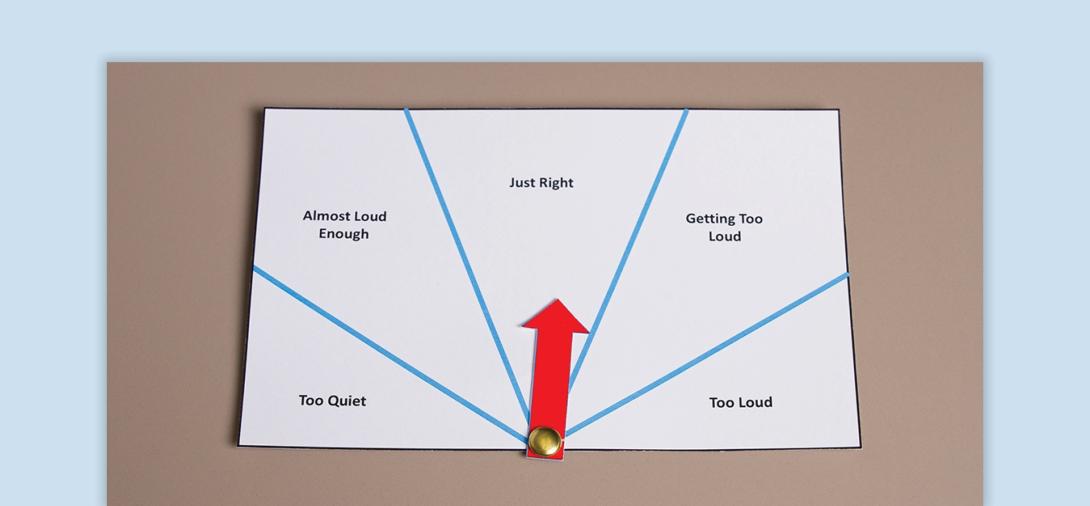
A voice volume meter is a visual tool that helps students regulate their voice levels across different environments.
When to Use:
- Teaching appropriate voice levels in various settings (e.g., classroom, cafeteria, playground).
- Providing a reference to help students self-monitor and adjust their volume.
- Supporting students who may struggle with social communication or sensory regulation.
- Encouraging consistency in voice level expectations across different activities.
How to Use:
- Introduce the Voice Volume Meter - Show the student the visual and explain how it helps them understand appropriate voice levels.
- Demonstrate and Practice - Model each voice level (e.g., whisper, normal talking, playground voice) and practice adjusting volume accordingly. Acknowledge and praise students when they use appropriate voice levels.
- Use in Different Settings - Before transitioning to a new environment, remind the student of the expected voice level using the meter.
- Provide Visual and Verbal Cues - When the student’s voice level does not match the environment, point to the meter as a gentle reminder. Combine the meter with other visual supports, such as social stories or classroom rules.
- Gradual Independence - Initially provide frequent reminders, then encourage students to check the meter on their own.
Tips:
- Place the voice volume meter in a visible location where students can easily reference it.
- Use real-life scenarios and social narratives to reinforce when to use different voice levels.
- Be consistent in reinforcing appropriate volume levels across different environments.
- For students who need additional support, pair the meter with a nonverbal cue (e.g., pointing to the meter using a hand signal).
Variations:
- Whole-Class Management - Use a voice meter to regulate the volume of an entire classroom, not just individual students.
- Personalized Voice Meters - Provide individualized meters for students who need more direct support.
- Alternative Formats - Use digital or interactive versions of the meter for added engagement.
Related Courses

Autism
Antecedent-Based Intervention
Learn how to modify the environment to decrease interfering behavior and increase engagement.
View Course

Autism
Visual Supports
Discover the power of visual supports for supporting students with ASD. Learn about implementation steps, skills, and resources to enhance independence.
View Course