Individual Schedules
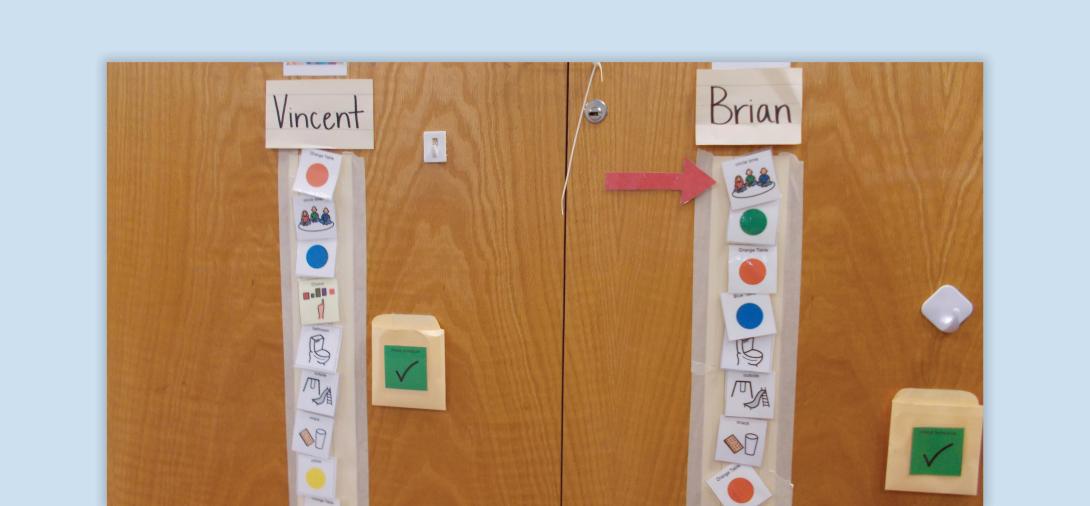
Individual schedules are visual tools that provide students with clear expectations, structure, and predictability, helping them transition between activities and build independence in navigating their day. These schedules help to reduce anxiety, improve engagement, and foster independence by offering consistent visual cues.
When to use:
- Helps students understand what’s next and move between activities smoothly. Use for every transition
- Structure and predictability reduce anxiety and resistance by making the day more predictable.
- Students who struggle with verbal directions benefit from a visual representation of expectations.
- Can be adapted based on a student’s age, skills, and mode of communication for varying abilities and needs.
How to use:
- Determine the Schedule Format - Choose a format based on the student’s developmental level and needs:
- Objects (for students who require concrete representation)
- Pictures (e.g., real photos, picture software)
- Written Schedules (for students who can read)
- Combination of the above for gradual progression
- Decide the Direction and Placement - Depending on the student’s preference, you may consider a top-to-bottom or left-to-right orientation.
- Establish a Cueing System - Choose a consistent cue to signal the student to check their schedule, such as a verbal prompt, “Check your schedule,” or a visual icon.
- Determine How the Student Indicates Completion - Students should have a clear way to show they completed a task, such as moving an icon to a finished box or checking off the activity.
- Plan Who Will Maintain the Schedule - Assign responsibility for setting up schedules before the school day, adjusting for changes throughout the day and resetting schedules for the next day.
- Implement and Reinforce Schedule Use - Explicitly teach and reinforce successful transitions with verbal praise and a preferred item (if appropriate).
Tips:
- Match Schedule to Student Ability - Start with objects or pictures and gradually transition to written formats if appropriate.
- Ensure Easy Access - Keep schedules in a consistent location so students can find them independently.
- Use Realistic, Clear Visuals - Photos should clearly show relevant stimuli without distractions.
- Provide Reinforcement - Offer praise or rewards for successfully checking and following the schedule.
- Monitor and Adjust Regularly - If a student struggles, modify schedule complexity, placement or prompting level.
Variations:
- Mobile vs. Stationary Schedules - Schedules can be mounted on the wall or on a clipboard. You may also consider digital schedules such as on a tablet or classroom screen.
- Using a First/Then Format for Simplicity - For students who need extra support, use a First/Then card before transitioning to a full schedule.
- Using a Timer with Schedules - Pair a schedule with visual timers to help students transition between tasks more easily.
Related Course

Autism
Visual Supports
Discover the power of visual supports for supporting students with ASD. Learn about implementation steps, skills, and resources to enhance independence.
View Course