Visual Countdown
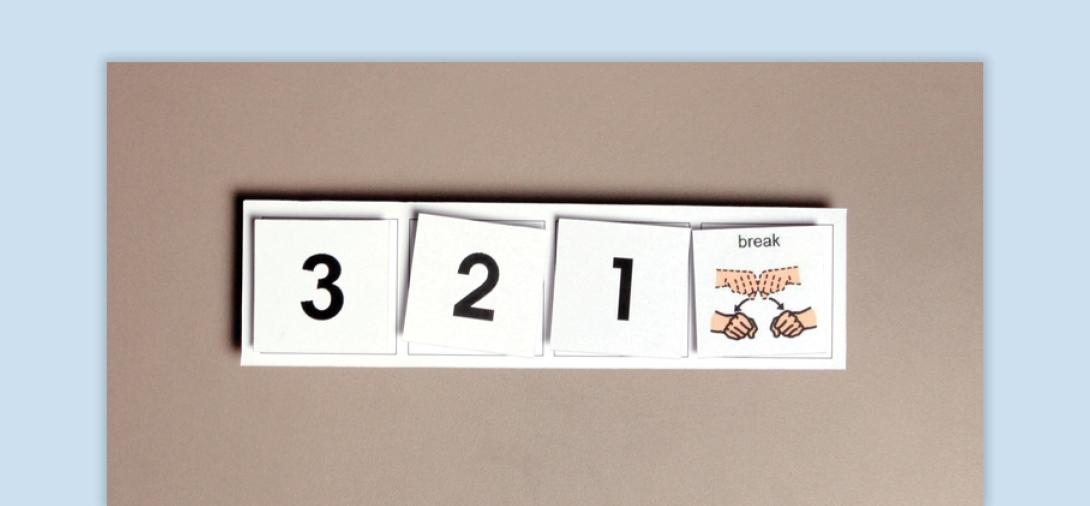
A Visual Countdown is a teacher-controlled transition support that provides students with a flexible, visual representation of time remaining in an activity. Unlike traditional timers, a visual countdown does not display specific time increments, allowing for individualized pacing based on student needs.
When to Use:
- Support transitions between activities by providing a structured cue.
- Reduce resistance by offering a predictable end to preferred activities.
- Encourage task engagement by gradually extending participation in non-preferred tasks.
- Promote independence by using a consistent visual format to signal upcoming changes.
How to Use:
- Introduce the Countdown - Show the visual and provide a verbal cue (e.g., “In 5, we will clean up”).
- Remove Visuals Gradually - Remove countdown markers (e.g., numbers, icons) at appropriate intervals. Ensure the student can see both the countdown and the removal process.
- Complete the Transition - Remove the final visual and state “(Activity) is finished. It’s time for …” Provide a “transition support,” such as a finished card or schedule reminder.
Tips:
- Ensure the student has a clear line of sight to the countdown.
- Pair with visual schedules or reinforcement systems for increased effectiveness.
- Use a neutral and consistent approach to avoid power struggles.
Variations:
- Digital or Paper-Based - Use printed templates, whiteboards, sticky notes, or fingers.
- Embedded within Activities - Create a quick countdown using classroom materials.
Related Content

Autism
Visual Supports
Discover the power of visual supports for supporting students with ASD. Learn about implementation steps, skills, and resources to enhance independence.
View Course
Autism, Behavior
Visual Timer
A visual that provides students with the time remaining before a transition.
View Tool/Template